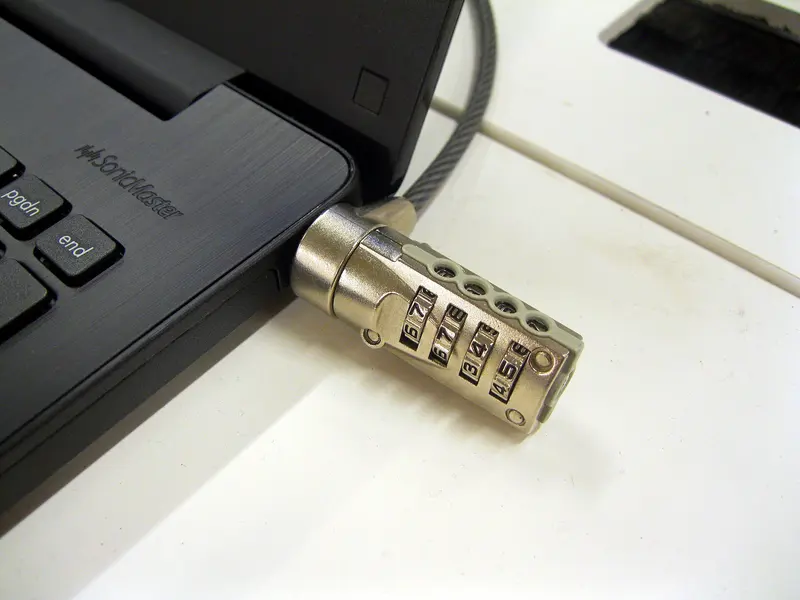
A laptop lock is a simple thing: a steel cable that loops round something solid, like a desk leg, and locks into a small slot on the side of the laptop. It won’t stop a determined thief with tools, but it stops a laptop being picked up and walked off with in a few seconds — in a shared house, a library, a co-working space or an office you share with visitors.
The part that confuses most people is the lock slot. Laptops don’t all have the same one, and a lock that fits one type won’t fit another. Here is what to look for, using the makers’ own descriptions.
Laptop lock slot types
Kensington lists three slot types on its product pages:
- Standard — the original Kensington Security Slot. Kensington says its T-Bar locks attach to the Kensington Security Slot “found on most laptops”. Locks such as the MicroSaver 2.0 list their slot type as Standard.
- Nano — a smaller slot for thinner laptops. Kensington says “the latest laptops from HP, Lenovo and Asus increasingly feature the Kensington Nano Security Slot”, and locks for it are listed as NanoSaver.
- Wedge — a wedge-shaped slot used on some ultra-thin and 2-in-1 laptops. Kensington’s Slim N17 2.0 for wedge-shaped slots says it is “tested and approved by Dell”.
How to tell which one your laptop has
Look along the sides and back of the laptop for a small slot, then check the specification sheet or manual from your laptop’s maker for the security slot type. If the maker’s details don’t mention a security slot at all, the laptop may not have one, and a cable lock won’t fit.
Not sure, or have several laptops in the house? Kensington’s Universal 3-in-1 Combination lock comes with swappable tips and, Kensington says, fits “standard, nano, or wedge-shaped laptop security slots”.
Keyed or combination?
- Keyed locks come with keys. Kensington’s newer locks share a 5 mm keying system, and its free Register & Retrieve service lets you order a replacement key if one is lost.
- Combination locks have no key to lose. The Universal 3-in-1 has a resettable four-digit dial (10,000 possible combinations), and the combination can also be retrieved through Register & Retrieve.
A combination lock suits a family or a student house where several people use the lock; a keyed lock suits one person who wants to leave the laptop set up on one desk.
Lock a laptop to a desk: what makes a good anchor
The lock is only as strong as what it’s tied to. Loop the cable round something that can’t be lifted or unscrewed — a fixed desk leg, a radiator pipe, a heavy piece of furniture — and make sure the cable can’t just be slid off the end. Most of the cables listed here are 1.8 m long, which is plenty to reach a desk leg; the Slim NanoSaver’s cable coils down to 76 mm so it packs into a bag.
Other ways to keep a laptop safe
A lock is one layer. The National Cyber Security Centre’s advice to people using work devices is that a device “is valuable and so it is attractive to thieves”, and to:
- not leave it unattended in an insecure location
- lock it away if possible, or keep it on your person
- be aware of who might be able to see your screen (a privacy screen helps — they are on the same laptop locks and privacy screens page)
- report a lost or stolen work device to your IT helpdesk immediately
For papers and small devices at home, a fire-resistant safe or chest is another option — our guide to fire-resistant safes and chests explains the ratings. And if the worst happens, our post on a lost or stolen laptop or phone covers the first hour.
The locks, from the makers’ details
These are listed with each maker’s specifications. We haven’t tested them and don’t recommend one over another — check the slot type against your own laptop first.
Laptop locks & privacy screensRef. HW-028
Kensington MicroSaver 2.0 Keyed Laptop Lock
Keyed cable lock · standard Kensington Security Slot
Sizes: 1.8 m (6 ft) cable
Suits: Laptops with a standard Kensington slot
A keyed steel cable lock that ties a laptop to a desk or other fixed object through the standard Kensington Security Slot. Suits a shared home office or a lapt…
Details about Kensington MicroSaver 2.0 Keyed Laptop Lock Search Amazon for this — Kensington MicroSaver 2.0 Keyed Laptop Lock (opens Amazon.co.uk)
Laptop locks & privacy screensRef. HW-029
Kensington Slim NanoSaver 2.0 Portable Keyed Laptop Lock
Keyed cable lock · Kensington Nano Security Slot
Sizes: Self-coiling cable, 1.8 m extended
Suits: Thin laptops with a Nano slot, carried between places
A slim keyed lock with a self-coiling steel cable for laptops that have Kensington's smaller Nano Security Slot. The coiled cable packs down small, so it suits…
Details about Kensington Slim NanoSaver 2.0 Portable Keyed Laptop Lock Search Amazon for this — Kensington Slim NanoSaver 2.0 Portable Keyed Laptop Lock (opens Amazon.co.uk)
Laptop locks & privacy screensRef. HW-030
Kensington Slim N17 2.0 Keyed Laptop Lock for Wedge-Shaped Slots
Keyed cable lock · wedge-shaped slot
Sizes: 1.8 m (6 ft) cable
Suits: Laptops with a wedge-shaped security slot
A low-profile keyed cable lock for laptops with a wedge-shaped security slot. It is designed not to block nearby ports and lets a thin laptop sit flat.
Details about Kensington Slim N17 2.0 Keyed Laptop Lock for Wedge-Shaped Slots Search Amazon for this — Kensington Slim N17 2.0 Keyed Laptop Lock for Wedge-Shaped Slots (opens Amazon.co.uk)
Laptop locks & privacy screensRef. HW-031
Kensington Universal 3-in-1 Combination Laptop Lock
4-digit combination · fits standard, Nano or wedge slots
Sizes: 1.8 m (6 ft) cable
Suits: Households with a mix of laptop brands
A combination cable lock with swappable tips for standard, Nano and wedge-shaped slots, so there is no key to lose. Handy for a family or shared student house…
Details about Kensington Universal 3-in-1 Combination Laptop Lock Search Amazon for this — Kensington Universal 3-in-1 Combination Laptop Lock (opens Amazon.co.uk)
As an Amazon Associate we earn from qualifying purchases. Most Amazon links open a search on Amazon.co.uk, where you can see the current price, sellers and delivery. We don’t show prices, ratings or Amazon’s photos, and we haven’t tested these products.
Does a lock affect your insurance?
That depends entirely on your policy. A policy may have its own conditions about laptops left unattended or taken out of the home, and a work laptop may be covered by your employer rather than by you. Read the wording or ask your insurer. Our guide to home insurance and working from home lists the questions to ask, and students can find more in keeping homework and coursework safe.