Keeping homework and coursework safe
A simple plan for pupils, students and parents: back coursework up in more than one place, look after the laptop, charge it safely and keep USB sticks where they belong — from NCSC, Electrical Safety First and fire service advice.
Losing a piece of coursework the night before it’s due is one of the worst feelings at school, college or university. Most of the time it can be prevented with a few habits. This guide is for pupils and students, and for the parents and carers helping them.
Keep more than one copy
The National Cyber Security Centre says to back up anything you value, and for anything you couldn’t replace, to think about keeping a copy in the cloud and on removable media such as a USB stick or external drive (NCSC: back up your data). That’s the idea behind the 3-2-1 backup rule: three copies, on two devices, with one kept somewhere else.
For homework, that could be:
- the copy on your laptop or the school computer;
- a copy in the cloud — if your school or college gives you an account for saving work, follow its rules about where coursework can be saved and shared;
- a copy on a USB stick or external drive at home.
Make it automatic, or put it in the diary
The NCSC says cloud backups can happen automatically, so you’re more likely to have a recent copy. If you use a USB stick or drive, it suggests setting a reminder so you do it regularly — for example every Sunday evening, or every time you finish a piece of work.
USB sticks: handy, but easy to lose
- Treat a USB stick as an extra copy, never the only one.
- If it holds personal details, password-protect it — the NCSC advises this in case removable media is lost or stolen. Integral says its Secure 360 comes with encryption software, and SanDisk lists password protection for the Ultra Flair through its app.
- Keep it on your keys: Samsung lists a keyring loop on the BAR Plus, and SanDisk a keyring hole on the Ultra Dual Drive Luxe.
- Some laptops and tablets only have USB-C sockets, while other computers have the older, larger USB-A kind. Dual sticks such as the SanDisk Luxe and the Integral 360-C Dual have one of each.
- Unplug it when you’ve finished: the NCSC warns that malware can spread to removable media that is left connected.
Look after the laptop
- A padded sleeve helps with knocks and scratches in a school bag. Thule lists 6 mm memory foam in the Koya sleeve, and Case Logic 10 mm padding in the Invigo Eco. Measure your laptop and check the maker’s size list.
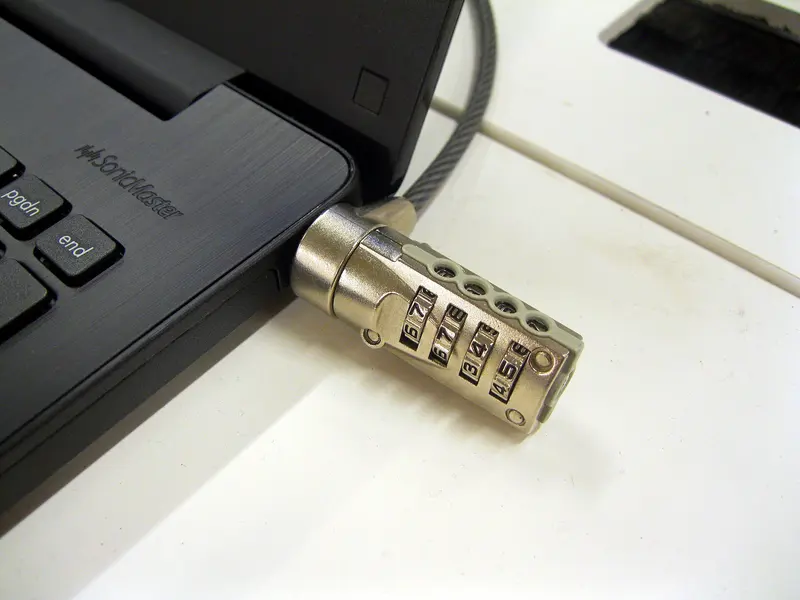
- A lock helps in shared spaces such as libraries and shared houses. Check your laptop’s security slot first: Kensington says recent HP, Lenovo and Asus laptops increasingly have its smaller Nano slot, which needs a lock such as the Slim NanoSaver 2.0. A combination lock means there’s no key to lose. Our post laptop locks explained shows how to tell the slot types apart.
- Keep it up to date. The NCSC suggests checking that your device is still supported by its maker and reviewing its security settings every few months (NCSC: securing your devices).
Charge it safely
- Use the charger that came with the laptop, or an official replacement (Electrical Safety First).
- Charge on a hard, flat surface — not on the bed or under pillows (Electrical Safety First).
- Don’t charge while you’re asleep, and don’t cover the laptop or charger while it charges (Scottish Fire and Rescue Service).
- Stop using a laptop whose battery swells, gets hot or smells strange, and tell an adult (SFRS).
Students in rented rooms
Electrical Safety First reminds students that landlords are legally responsible for making sure the electrical installation is safe, that it should be checked at least every five years or when a new tenancy starts, and that fixing electrical problems is the landlord’s job. It also suggests registering your own electrical products with their makers, so you can be told about recalls.
Is the laptop insured?
That depends on the household’s home insurance. A grown-up can check whether the policy covers a laptop when it’s taken out of the house — to school, college or university — and whether accidental damage is included. See home insurance and working from home. We don’t give insurance advice: the insurer is the one to ask.
See the students and homework kit list.
Sources
- NCSC: Always back up your most important data (checked 6 November 2026)
- NCSC: Securing your devices (checked 6 November 2026)
- Electrical Safety First: Laptops and notebooks (checked 6 November 2026)
- Electrical Safety First: Students (checked 6 November 2026)
- Scottish Fire and Rescue Service: Lithium-ion batteries (checked 6 November 2026)
- Kensington: Slim NanoSaver 2.0 Portable Keyed Laptop Lock (checked 6 November 2026)
- Integral: Secure 360 Encrypted USB (checked 6 November 2026)
- Samsung UK: BAR Plus USB flash drive (checked 6 November 2026)
- SanDisk: Ultra Dual Drive Luxe USB Type-C (checked 6 November 2026)
- Thule: Koya laptop sleeve (checked 6 November 2026)
Checked 6 November 2026.